
Buy to Open, Sell to Close: How Options Orders Actually Work
⚡ Key Takeaways
- Buy to Open (BTO) creates a new long options position, either a long call or a long put
- Sell to Close (STC) exits a long position you previously opened with BTO
- Sell to Open (STO) creates a new short options position, collecting premium upfront
- Buy to Close (BTC) exits a short position you previously opened with STO
- Confusing these order types is one of the most common options trading mistakes and can result in unintended positions
What Do Buy to Open, Sell to Close, Buy to Close, and Sell to Open Mean?
Buy to Open (BTO), Sell to Close (STC), Sell to Open (STO), and Buy to Close (BTC) are the four order actions in options trading that specify whether you are entering or exiting a position and whether you are buying or selling. Every options trade uses exactly one of these four actions.
The "open" and "close" designations tell your broker whether you are creating a new position or closing an existing one. This matters because it affects your account's open interest, margin requirements, and how the trade is processed. Getting these wrong can accidentally double your position instead of closing it, or create a naked short instead of exiting a long.
Stock traders only deal with "buy" and "sell." Options traders must specify the direction (buy/sell) and the intent (open/close), creating four possible combinations.
Buy to Open (BTO): Opening a Long Position
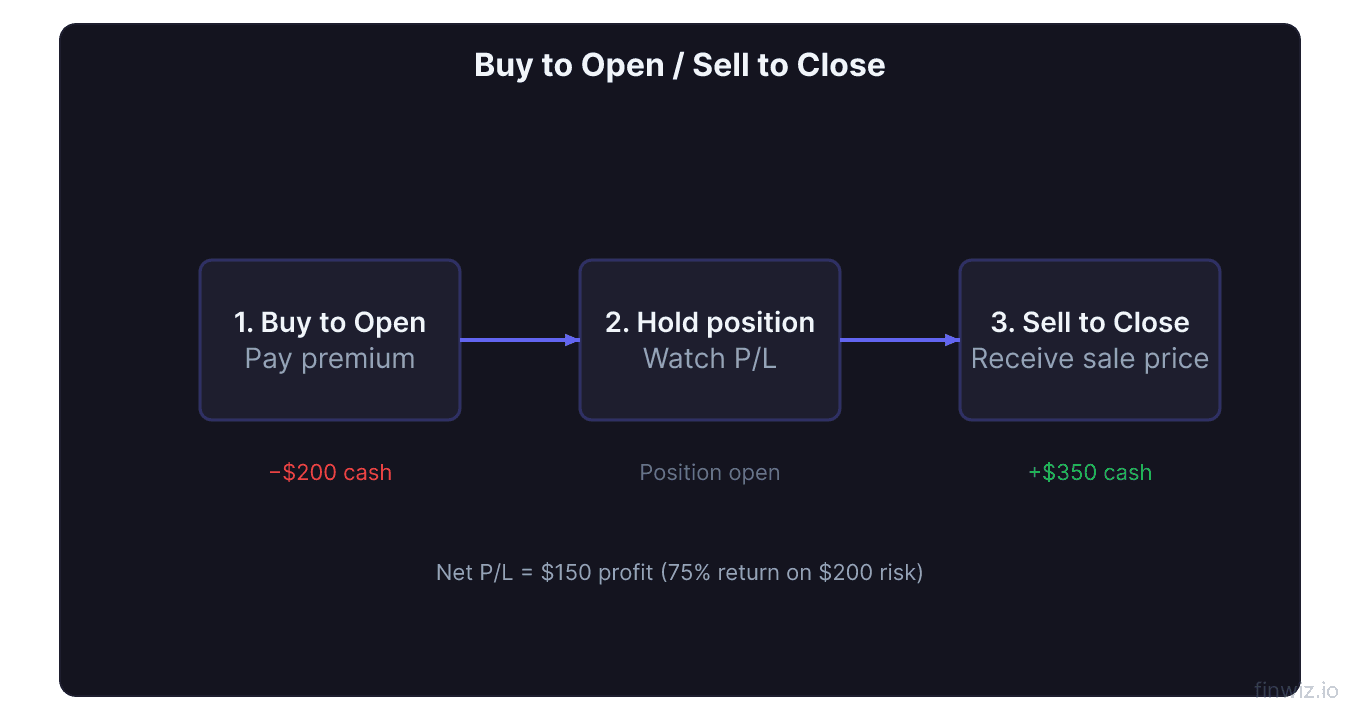
Buy to Open is used when you want to purchase an option to create a new position. After a BTO order fills, you own the option contract and have the right (but not the obligation) to exercise it.
When you use BTO:
- Buying a call because you are bullish
- Buying a put because you are bearish
- Buying a put to protect stock you own (protective put)
- Buying any option as part of a spread's long leg
Example: You think AAPL will rise from $180 to $200 in the next month. You place a BTO order for 1 AAPL $185 call at $4.00. You pay $400 and now own the call. You are long one call contract.
Key characteristics of BTO positions:
- You pay the premium (debit from your account)
- Your maximum loss is the premium paid
- Time decay (theta) works against you
- You can close the position later with a Sell to Close order
Sell to Close (STC): Exiting a Long Position
Sell to Close is used when you want to exit a long options position that you previously opened with BTO. This sells the option back to the market and eliminates your position.
When you use STC:
- Taking profit on a call or put you bought
- Cutting losses on a long option
- Closing the long leg of a spread
Example: The AAPL $185 call you bought for $4.00 is now worth $8.50. You place a STC order to sell it at $8.50. You receive $850, locking in a $450 profit. You no longer have any position.
The BTO/STC pair is the most intuitive. Buy something, then sell it later. This is how most beginner options traders operate.
Sell to Open (STO): Opening a Short Position
Sell to Open is used when you want to sell an option you do not currently own, creating a new short position. You are now the option seller (writer) and have an obligation to fulfill the contract if the buyer exercises.
When you use STO:
- Selling covered calls against stock you own
- Selling cash-secured puts to generate income
- Writing naked calls or puts
- Selling the short leg of a spread
Example: You own 100 shares of AAPL at $180. You want to sell a covered call. You place a STO order for 1 AAPL $195 call at $3.00. You receive $300 in premium immediately. You are now short one call contract.
Key characteristics of STO positions:
- You receive the premium (credit to your account)
- Your maximum profit is the premium collected (for the short leg)
- Time decay (theta) works in your favor
- You can close the position later with a Buy to Close order
- Margin or collateral may be required
Buy to Close (BTC): Exiting a Short Position
Buy to Close is used when you want to exit a short options position that you previously opened with STO. You buy back the option to eliminate your obligation.
When you use BTC:
- Taking profit on a short option that has decayed
- Cutting losses on a short option that moved against you
- Closing the short leg of a spread
- Buying back a covered call or cash-secured put
Example: The AAPL $195 call you sold for $3.00 has decayed to $0.50 with one week left. You place a BTC order at $0.50. You pay $50 to close, keeping $250 of the original $300 premium. Your obligation is eliminated.
Pro Tip
The Four Order Types at a Glance
| Order Type | Action | Position Effect | Cash Flow | You Are... |
|---|---|---|---|---|
| Buy to Open (BTO) | Buy | Creates new long | Debit (pay) | Buyer/holder |
| Sell to Close (STC) | Sell | Closes existing long | Credit (receive) | Exiting buyer |
| Sell to Open (STO) | Sell | Creates new short | Credit (receive) | Seller/writer |
| Buy to Close (BTC) | Buy | Closes existing short | Debit (pay) | Exiting seller |
The rule is simple: "Open" creates a new position. "Close" eliminates an existing position. Always pair BTO with STC, and STO with BTC.
Common Mistakes and How to Avoid Them
Mistake 1: Using STO When You Mean STC
You bought a call with BTO and want to take profit. You accidentally select Sell to Open instead of Sell to Close. Now instead of closing your long call, you have created a new short call position. You are now long one call AND short one call on the same underlying.
How to fix: Immediately BTC the accidentally opened short position. Then STC your original long position.
How to prevent: Most brokers show your existing positions on the order ticket. Verify that the order says "closing" before submitting.
Mistake 2: Using BTO When You Mean BTC
You sold a put with STO and the stock is crashing. You want to close the short put. You accidentally select Buy to Open instead of Buy to Close. Now you own an additional long put instead of closing your short. You are short one put AND long one put.
How to fix: STC the accidentally opened long position. Then BTC your original short position.
Mistake 3: Doubling Your Position
You own 5 long calls and want to sell 2 of them. You accidentally submit a BTO order for 2 more calls instead of an STC for 2. Now you own 7 calls instead of 3. This doubles your risk exposure and capital at risk.
Mistake 4: Submitting the Wrong Quantity
Even with the correct order type, submitting 10 contracts when you meant 1 is a costly error. Always verify the quantity and the total order value before hitting submit.
Order Entry Walkthrough
Here is a step-by-step walkthrough for a complete options trade lifecycle:
Step 1: Opening a long call
- Navigate to the option chain for the stock
- Select the call at your desired strike and expiration
- Choose Buy to Open
- Set your limit price
- Set quantity (number of contracts)
- Review the order: confirm it says "BTO," shows the correct strike, expiration, and total cost
- Submit
Step 2: Monitoring the position
- The position appears in your portfolio as a long call
- Track unrealized P/L, delta, theta, and time remaining
Step 3: Closing the long call
- From your positions screen, select the long call
- Choose Sell to Close
- Set your limit price (or use market order for immediate execution)
- Set quantity (all or partial close)
- Review and submit
- Position is removed from your portfolio
Multi-Leg Orders and Spreads
When trading spreads, you use two order types simultaneously. Here is how the four actions apply to common strategies:
Bull call spread (opening):
- BTO the lower strike call (long leg)
- STO the higher strike call (short leg)
Bull call spread (closing):
- STC the lower strike call
- BTC the higher strike call
Cash-secured put (opening and closing):
- STO the put (open)
- BTC the put (close)
Iron condor (opening):
- STO the call (short call)
- BTO the higher call (long call, protection)
- STO the put (short put)
- BTO the lower put (long put, protection)
Most brokers let you submit multi-leg orders as a single ticket, which ensures all legs fill simultaneously. This is safer than legging in one contract at a time.
Open Interest and Your Orders
Open interest is the total number of outstanding contracts for a specific option. Your orders affect it as follows:
- BTO + STO (new buyer meets new seller): Open interest increases by 1
- BTC + STC (existing seller buys from existing buyer): Open interest decreases by 1
- BTO + STC (new buyer buys from existing holder): Open interest unchanged
- STO + BTC (new seller sells to existing seller closing): Open interest unchanged
This matters for liquidity. High open interest means more participants and tighter bid-ask spreads, making it easier to enter and exit positions at fair prices.
Limit Orders vs. Market Orders for Options
Always use limit orders for options. The bid-ask spread on options is typically much wider than on stocks. A market order fills at the ask (for buys) or bid (for sells), which can be significantly worse than the midpoint.
Example: An option has a bid of $2.00 and an ask of $2.40. The midpoint is $2.20.
- Market BTO fills at $2.40 (you overpay by $0.20 per contract, or $20)
- Limit BTO at $2.20 may fill at the midpoint, saving $20 per contract
For 10 contracts, that is a $200 difference. Over hundreds of trades per year, sloppy order entry with market orders can cost thousands.
Start with the midpoint and adjust from there. If you need a faster fill, move your limit toward the natural side (higher for buys, lower for sells) in $0.05 increments.
Frequently Asked Questions
What happens if I accidentally use the wrong order type?
You will either create an unintended new position or fail to close your existing one. If you realize the mistake immediately, submit the correct closing order right away. Most brokers also have a "close position" button on the portfolio screen that automatically selects the correct order type.
Can I use Buy to Close if I do not have a short position?
No. Your broker will reject a BTC order if you do not have an existing short position in that specific option. Similarly, STC orders are rejected if you do not hold a long position. This is one reason brokers require the open/close designation — it serves as an error check.
Do I need to close my options before expiration?
Not necessarily, but it is often wise. ITM options are typically auto-exercised at expiration, which may result in stock assignment. If you do not want to exercise or be assigned, close the position with STC (for longs) or BTC (for shorts) before the expiration date.
Why do some brokers not ask for open/close?
A few modern brokers automatically determine whether your order is opening or closing based on your existing positions. This simplifies the process but removes a layer of error checking. Most traditional brokers still require you to specify.
What is the difference between BTC and covering a short?
They are the same thing. Buy to Close is the options term for covering (buying back) a short position. In stock trading, you "cover" a short. In options trading, you "buy to close" a short. The mechanics are identical.
Disclaimer
This is educational content, not financial advice. Trading involves risk, and you should consult a qualified financial advisor before making any investment decisions. Past performance does not guarantee future results.
Related Articles
12 chapters covering charts, indicators, risk management & more. Plus weekly trading insights.