
Stop-Loss Orders: Protecting Your Trading Capital
⚡ Key Takeaways
- A stop-loss order automatically sells your position when the price drops to a specified level, limiting potential losses
- Stop losses are the primary tool for protecting trading capital and managing risk
- Placement should be based on technical levels like support, trend lines, or ATR, not arbitrary percentages
- Mental stops rely on discipline and often fail under pressure; hard stops are placed in the broker platform
- Every trade should have a stop loss defined before entry as part of a complete trading plan
What Is a Stop-Loss Order?
A stop-loss order is a standing instruction to your broker to sell a stock when it drops to a specified price. When the stop price is reached, the order automatically converts to a market order and executes at the best available price.
Stop losses exist for one purpose: to protect your capital by limiting how much you can lose on a single trade. Without stop losses, a small losing trade can become a devastating one as you hold on, hoping for a recovery that may never come.
The stop loss is not a sign of weakness or pessimism. It is a professional risk management tool used by every successful trader. The question is never whether to use a stop loss, but where to place it.
How Stop-Loss Orders Work
- You buy a stock at $50.00.
- You place a stop-loss order at $47.00.
- If the stock drops to $47.00, the stop triggers and converts to a market order.
- The market order fills at the best available price, closing your position.
- Your maximum loss is approximately $3.00 per share (minus any slippage).
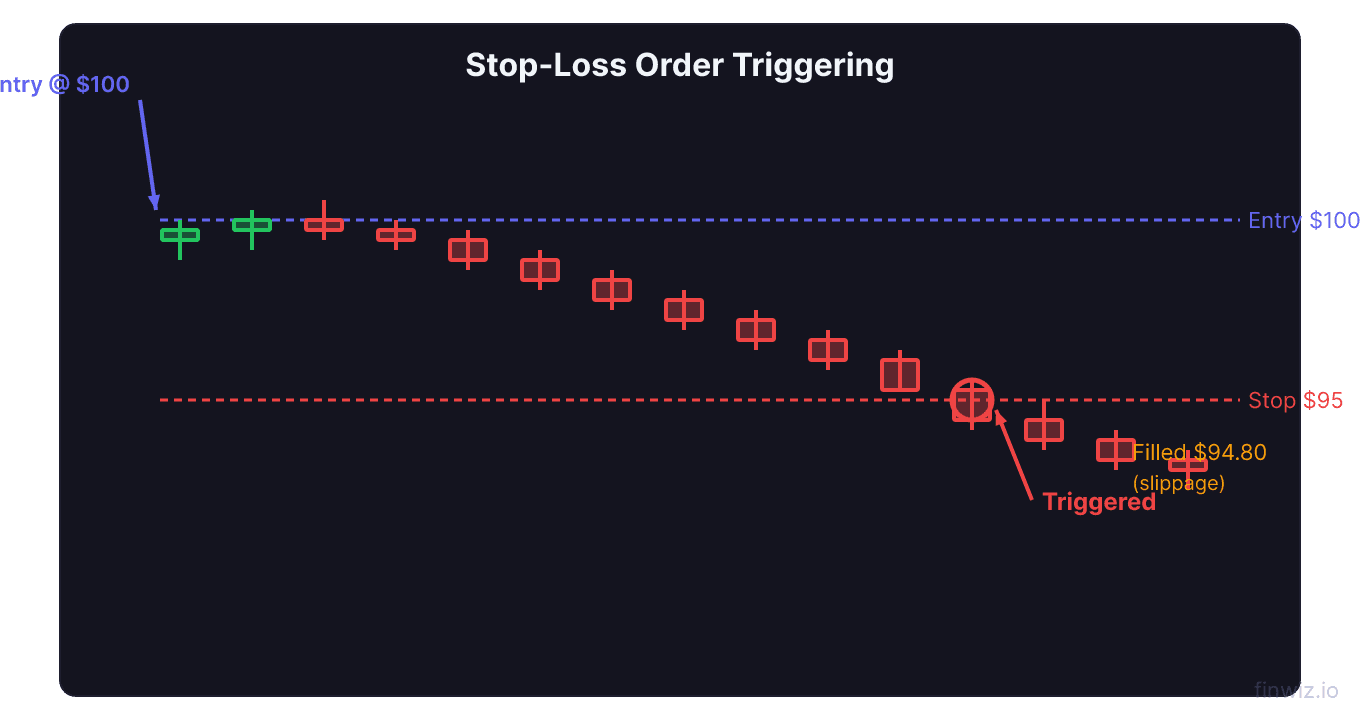
The stop-loss order is passive until triggered. It sits with your broker, monitoring the price automatically. You do not need to watch the screen for it to work.
Pro Tip
Stop-Loss Placement Strategies
Below Support
Place your stop just below a significant support level. If support breaks, your trade thesis is invalidated, and the stop takes you out.
The advantage of support-based stops is that they are logical. They correspond to a real change in market structure rather than an arbitrary number. A small buffer below support (a few cents to $0.50 depending on the stock) helps avoid being triggered by wicks that briefly pierce support.
Below the Moving Average
If you entered on a moving average bounce, place your stop just below the moving average that triggered the entry. If the stock closes below that moving average, the bounce has failed and your trade is invalid.
ATR-Based Stops
The Average True Range (ATR) adapts your stop to the stock's volatility. A stock with high ATR gets a wider stop; a stock with low ATR gets a tighter stop.
Stop Loss = Entry Price - (Multiplier x ATR)For a stock with a $2.00 ATR and a multiplier of 1.5: Stop = Entry - (1.5 x $2.00) = Entry - $3.00
Percentage-Based Stops
A simple approach is to set the stop at a fixed percentage below your entry:
- Conservative: 3-5% for lower volatility stocks
- Standard: 5-8% for typical swing trades
- Aggressive: 8-12% for highly volatile stocks
While simple, percentage stops do not account for the stock's actual price structure. A 5% stop might be below a key support level on one stock but above it on another. Use percentage stops only as a starting point, then adjust based on chart levels.
Below the Entry Candle
For short-term trades, place the stop just below the low of the entry candle or the low of the signal candle that triggered your entry. This is common in day trading and aggressive swing trading.
Where NOT to Place Stop Losses
- At round numbers: Many traders place stops at $50.00, $100.00, etc. Market makers and algorithms know this and may push the price to these levels to trigger stops before reversing. Place your stop a few cents beyond round numbers.
- At the exact support level: Support is a zone, not a line. Place your stop slightly below the zone to allow for normal price fluctuation.
- Too tight: A stop within normal daily fluctuation will be triggered constantly, resulting in a series of small losses that drain your account. Compare your stop distance to the stock's ATR.
- Too wide: A stop that is too far from your entry limits your position size and creates an unfavorable risk-reward ratio.
Hard Stops vs. Mental Stops
A hard stop is an actual order placed in your broker's platform. It executes automatically.
A mental stop is a price level you note mentally and plan to sell at if reached. No order is placed.
Hard stops are vastly superior for most traders. Mental stops require you to be watching the screen when the stop level is hit and require the discipline to execute in the moment. In practice, most traders who use mental stops either are not watching when the price drops or convince themselves to "give it a bit more room." This leads to much larger losses than planned.
The only traders who successfully use mental stops are very experienced professionals who can execute without hesitation. For everyone else, hard stops are essential.
Stop Loss and Position Sizing
Your stop-loss distance directly determines your position size. The relationship is:
Position Size = (Account Risk Amount) / (Entry Price - Stop Price)A wider stop means fewer shares. A tighter stop means more shares. This relationship ensures your dollar risk remains constant regardless of the stop distance.
Common Stop-Loss Mistakes
- Not using one: The most damaging mistake. Every trade must have a defined exit for loss.
- Moving it further away: When a trade goes against you, the temptation is to widen the stop. Never do this. It turns a small, planned loss into an unplanned large loss.
- Using the same stop for every stock: A $2 stop on a $10 stock is 20%. A $2 stop on a $100 stock is 2%. Adapt your stop to each stock's price and volatility.
- Placing too many orders at the same level: If your stop is at a very common level (round number, obvious support), you may get filled during a stop hunt and watch the stock immediately reverse.
Stop Losses and Gaps
One limitation of stop-loss orders is that they cannot protect against gaps. If a stock closes at $50.00 and opens the next day at $44.00 due to bad news, your stop at $47.00 triggers at the open and fills at approximately $44.00, not $47.00.
This gap risk is inherent to swing trading. To manage it:
- Keep position sizes small enough that even a gap-related loss is manageable
- Avoid holding through known catalysts (earnings, FDA decisions) unless that is your strategy
- Consider stop-limit orders if you prefer the risk of non-execution over the risk of a terrible fill
Frequently Asked Questions
What percentage stop loss should I use?
There is no universal percentage. Your stop should be based on technical analysis, not a fixed percentage. Place it at a level where your trade thesis is invalidated. Then use position sizing to ensure the dollar risk at that stop level matches your risk tolerance (typically 1-2% of account equity).
Should I use a stop loss for long-term investments?
This depends on your investment philosophy. Long-term investors often use wider stops (15-25%) or no stop at all, relying on fundamental analysis to determine whether a decline is a buying opportunity. Active traders should always use stop losses.
How do I avoid being stopped out on normal volatility?
Set your stop at least 1.5 ATR from your entry. This gives the stock room for normal daily fluctuations. If your stop is consistently being hit before the stock moves in your expected direction, your stop is too tight.
Can I set a stop loss and a profit target at the same time?
Yes. This is called a bracket order (or OCO order). You set a stop loss below and a sell limit above simultaneously. When one order fills, the other is automatically cancelled. This is the most efficient way to manage swing trades.
Do market makers hunt stop losses?
There is evidence that price frequently moves to areas of concentrated stop orders before reversing. Whether this is deliberate "hunting" or simply the result of supply and demand dynamics is debated. Regardless, placing your stops at non-obvious levels slightly beyond common placement points helps you avoid this issue.
Disclaimer
This is educational content, not financial advice. Trading involves risk, and you should consult a qualified financial advisor before making any investment decisions. Past performance does not guarantee future results.
Additional Considerations
Order Types and Trading Platforms
Different brokerage platforms offer varying levels of order type functionality. When choosing a broker, verify that it supports the order types your trading plan requires. Key features to confirm include:
- Support for bracket orders and OCO (One-Cancels-Other) logic
- Trailing stop functionality with both percentage and dollar-based options
- Stop-limit orders with customizable buffer distances
- Extended hours order capability
- Mobile app support for all order types (not just market and limit)
- Conditional orders that trigger based on price, time, or other criteria
Many beginning traders start with a broker that offers limited order types and later realize they need more sophisticated tools. Consider your future needs when choosing a platform, not just your current requirements.
Order Type Selection by Market Condition
The optimal order type varies with market conditions:
During normal volatility, limit orders are the default choice for entries and profit targets. They provide price control with reasonable fill probability.
During high volatility, consider using wider limit prices or market orders for urgent exits. Spreads widen during volatility, making tight limit orders less likely to fill when you need them most.
During pre-market and after-hours sessions, always use limit orders. Market orders in extended hours can fill at prices far from the last regular-session price.
During earnings announcements and major news events, be prepared for rapid price changes that can affect all order types. Stop-loss orders may fill with significant slippage, and stop-limit orders may not fill at all.
Building an Order Type Workflow
Develop a consistent workflow for placing orders:
- Analyze the chart and identify your entry, stop, and target levels
- Calculate position size based on your stop distance
- Select the appropriate entry order type (limit for planned levels, stop for breakouts)
- Set your protective stop (stop-loss or stop-limit based on your preference)
- Set your profit target (limit order at your target level)
- Consider a bracket order to automate steps 3-5 as a single package
- Review all order details before submitting
This systematic approach ensures you never enter a trade without complete risk management in place.
Related Articles
12 chapters covering charts, indicators, risk management & more. Plus weekly trading insights.