
Stop-Limit vs Stop-Loss: Which Order Type Should You Use?
⚡ Key Takeaways
- Stop-loss orders guarantee execution but not price; stop-limit orders guarantee price but not execution
- Stop-loss orders convert to market orders when triggered, filling at whatever price is available
- Stop-limit orders convert to limit orders when triggered, filling only at the limit price or better
- Stop-loss orders are better for protecting capital when you must exit no matter what
- Stop-limit orders are better when you prefer not selling at all over selling at a drastically worse price
Stop-Limit vs. Stop-Loss: Understanding the Difference
Both stop-loss orders and stop-limit orders use a trigger price (the stop) to activate, but what happens after they trigger is fundamentally different. This distinction has real consequences for how your trades are managed and how much risk you carry.
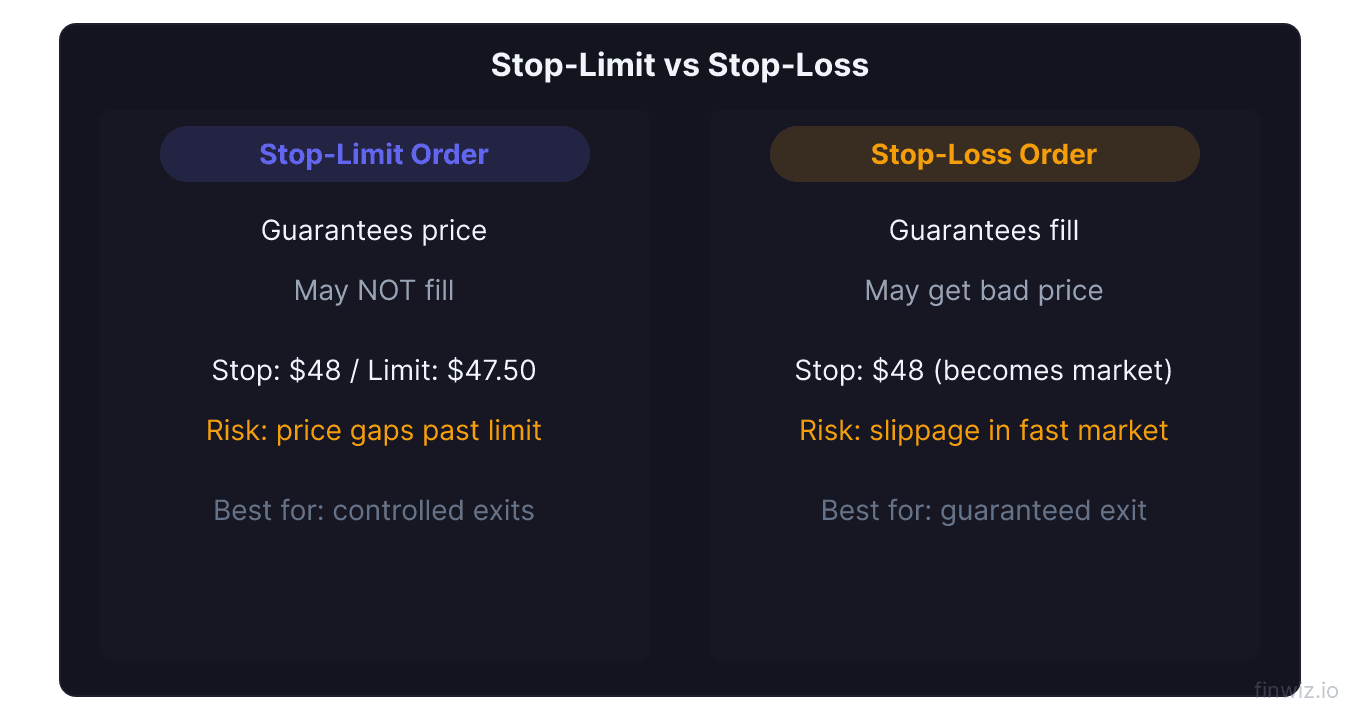
Understanding when to use each order type is a practical risk management skill that every trader needs.
How Each Order Works
Stop-Loss Order Mechanics
- You set a stop price (e.g., $47.00).
- When the stock hits $47.00, the order converts to a market order.
- The market order fills immediately at the best available price.
- You are out of the position, guaranteed.
Stop-Limit Order Mechanics
- You set a stop price (e.g., $47.00) and a limit price (e.g., $46.50).
- When the stock hits $47.00, the order converts to a limit order at $46.50.
- The limit order fills only if the stock is trading at $46.50 or higher.
- If the stock drops below $46.50, the order does not fill. You remain in the position.
Side-by-Side Comparison
| Feature | Stop-Loss | Stop-Limit |
|---|---|---|
| Trigger | Stop price reached | Stop price reached |
| Converts to | Market order | Limit order |
| Execution guaranteed? | Yes | No |
| Price guaranteed? | No | Yes (if it fills) |
| Gap risk behavior | Fills at gap price | May not fill at all |
| Slippage risk | Yes | No |
| Non-execution risk | No | Yes |
| Complexity | Simple (one price) | More complex (two prices) |
| Best for | Guaranteed exit | Price-controlled exit |
Scenario 1: Normal Market Decline
The stock drops gradually from $50.00 through your stop at $47.00.
Stop-loss result: The order triggers at $47.00 and fills at approximately $47.00. Minor slippage of a few cents is possible. You exit the position successfully.
Stop-limit result (stop $47.00, limit $46.50): The order triggers at $47.00 and the limit order fills at $47.00 or close to it, well within the $46.50 limit. You exit the position successfully.
Both orders work well in normal conditions. The difference is negligible.
Scenario 2: Fast Market Decline
The stock drops sharply, falling from $47.50 to $45.00 in seconds due to breaking news.
Stop-loss result: The order triggers at $47.00 and converts to a market order. Because the market is moving fast, you fill at approximately $45.50 (significant slippage). You are out of the position with a worse-than-expected loss.
Stop-limit result (stop $47.00, limit $46.50): The order triggers at $47.00, but by the time the limit order hits the exchange, the stock is at $45.50. Since $45.50 is below your $46.50 limit, the order does not fill. You are still in the position as the stock continues to fall.
The stop-loss order fills with slippage. The stop-limit order does not fill at all. Which is worse depends on what happens next: if the stock rebounds above $46.50, the stop-limit trader avoids the loss; if it continues falling, the stop-loss trader took a smaller loss than the stop-limit trader will eventually take.
Scenario 3: Overnight Gap
The stock closes at $48.00. Overnight, bad news causes it to gap down, opening at $42.00.
Stop-loss result: The order triggers at the open (since $42.00 is below the $47.00 stop) and fills at approximately $42.00. You exit with a much larger loss than planned.
Stop-limit result (stop $47.00, limit $46.50): The order triggers at the open, but $42.00 is far below the $46.50 limit. The order does not fill. You hold the position through the gap.
This is the critical scenario. With a stop-loss, you take a large unplanned loss. With a stop-limit, you keep the position. If the stock eventually recovers, the stop-limit approach was better. If it continues falling, you face an even larger loss with no exit.
Pro Tip
When to Use a Stop-Loss Order
- When you must exit: If losing more than your planned amount is unacceptable, a stop-loss guarantees you get out.
- For volatile stocks: Stocks that move fast and gap frequently need the execution guarantee of a stop-loss.
- For risk management: When your position sizing is calibrated to a specific maximum loss, a stop-loss ensures that maximum is enforced.
- For automatic protection: When you cannot monitor the market and need guaranteed exits.
When to Use a Stop-Limit Order
- When the price matters more than the exit: If you would rather hold a position than sell at a drastically worse price, a stop-limit gives you that control.
- For breakout entries: On the buy side, stop-limits prevent you from paying an inflated price on a volatile breakout.
- For illiquid stocks: In stocks with wide bid-ask spreads, a stop-limit prevents filling at an extremely unfavorable price.
- When you can monitor the trade: If you are watching the market and can manually intervene if the stop-limit does not fill, this order type gives you more control.
Hybrid Approach
Some experienced traders use a layered approach:
- Place a stop-limit order as the primary stop (e.g., stop $47.00, limit $46.50).
- Place a secondary stop-loss order at a wider level as a disaster stop (e.g., $45.00).
- The stop-limit handles normal declines with price control.
- The stop-loss acts as a backup if the stock drops past the stop-limit without filling.
This approach provides the best of both worlds but requires careful management to avoid confusion.
Choosing by Trading Style
| Trading Style | Recommended Stop Type | Rationale |
|---|---|---|
| Day trading | Stop-loss | Need guaranteed exits; no overnight gap risk |
| Swing trading | Stop-loss (primary) | Gap risk makes execution guarantee important |
| Position trading | Stop-limit or stop-loss | Longer horizons can absorb short-term gaps |
| Investing | Stop-limit or none | Recovery time is available |
Frequently Asked Questions
Can I use both a stop-loss and a stop-limit on the same position?
Most brokers do not allow two stop orders on the same position. However, you can use a bracket order that combines different order types. Alternatively, you can manually place a stop-loss at a wider level and a stop-limit at a tighter level, though this requires careful management.
Which order type do professional traders prefer?
Most professional traders use stop-loss orders for risk management because execution is paramount. They adjust their position sizing to account for potential slippage rather than risking non-execution with stop-limit orders. However, for breakout entries, many professionals use buy stop-limit orders.
Does my broker charge differently for stop-limit vs. stop-loss orders?
No. Most brokers charge the same commission (typically zero for stock trades) regardless of order type. The cost difference comes from execution quality (slippage on stop-loss orders vs. non-execution on stop-limit orders), not from commissions.
What happens to my stop order if the stock is halted?
When trading is halted by the exchange (due to circuit breakers, news pending, etc.), your stop order remains active but cannot trigger during the halt. When trading resumes, if the reopening price is at or past your stop, the order triggers at the reopening price. For stop-loss orders, this can result in significant slippage. For stop-limit orders, it may result in non-execution.
Should I factor slippage into my position sizing?
Yes, especially if you use stop-loss orders on volatile stocks. A practical approach is to calculate your position size assuming 0.5-1% slippage on your stop. This provides a buffer that keeps your actual loss within your risk tolerance even if the fill is worse than the stop price.
Disclaimer
This is educational content, not financial advice. Trading involves risk, and you should consult a qualified financial advisor before making any investment decisions. Past performance does not guarantee future results.
Additional Considerations
Order Types and Trading Platforms
Different brokerage platforms offer varying levels of order type functionality. When choosing a broker, verify that it supports the order types your trading plan requires. Key features to confirm include:
- Support for bracket orders and OCO (One-Cancels-Other) logic
- Trailing stop functionality with both percentage and dollar-based options
- Stop-limit orders with customizable buffer distances
- Extended hours order capability
- Mobile app support for all order types (not just market and limit)
- Conditional orders that trigger based on price, time, or other criteria
Many beginning traders start with a broker that offers limited order types and later realize they need more sophisticated tools. Consider your future needs when choosing a platform, not just your current requirements.
Order Type Selection by Market Condition
The optimal order type varies with market conditions:
During normal volatility, limit orders are the default choice for entries and profit targets. They provide price control with reasonable fill probability.
During high volatility, consider using wider limit prices or market orders for urgent exits. Spreads widen during volatility, making tight limit orders less likely to fill when you need them most.
During pre-market and after-hours sessions, always use limit orders. Market orders in extended hours can fill at prices far from the last regular-session price.
During earnings announcements and major news events, be prepared for rapid price changes that can affect all order types. Stop-loss orders may fill with significant slippage, and stop-limit orders may not fill at all.
Building an Order Type Workflow
Develop a consistent workflow for placing orders:
- Analyze the chart and identify your entry, stop, and target levels
- Calculate position size based on your stop distance
- Select the appropriate entry order type (limit for planned levels, stop for breakouts)
- Set your protective stop (stop-loss or stop-limit based on your preference)
- Set your profit target (limit order at your target level)
- Consider a bracket order to automate steps 3-5 as a single package
- Review all order details before submitting
This systematic approach ensures you never enter a trade without complete risk management in place.
12 chapters covering charts, indicators, risk management & more. Plus weekly trading insights.