
Bracket Orders: Automating Your Entry, Stop & Target
⚡ Key Takeaways
- A bracket order combines an entry order with a stop-loss and a profit target into a single automated package
- OCO (One-Cancels-Other) logic ensures that when the stop or target fills, the other order is automatically cancelled
- Bracket orders automate trade management, removing the need to manually adjust orders after entry
- They are ideal for swing traders who cannot monitor positions during market hours
- Most major brokerages support bracket orders, though the setup process varies by platform
What Is a Bracket Order?
A bracket order is a three-part order that automates the entire lifecycle of a trade: entry, stop loss, and profit target. When the entry fills, the stop loss and profit target are automatically placed. When either the stop or the target fills, the other is automatically cancelled.
This automation is built on OCO (One-Cancels-Other) logic. The stop loss and profit target are linked. Only one can execute; when it does, the other is removed from the order book.
Bracket orders are the most efficient way to manage trades, especially for swing traders who set up their trades in the evening and let them execute during the next trading day without constant monitoring.
How Bracket Orders Work
Step-by-Step Example
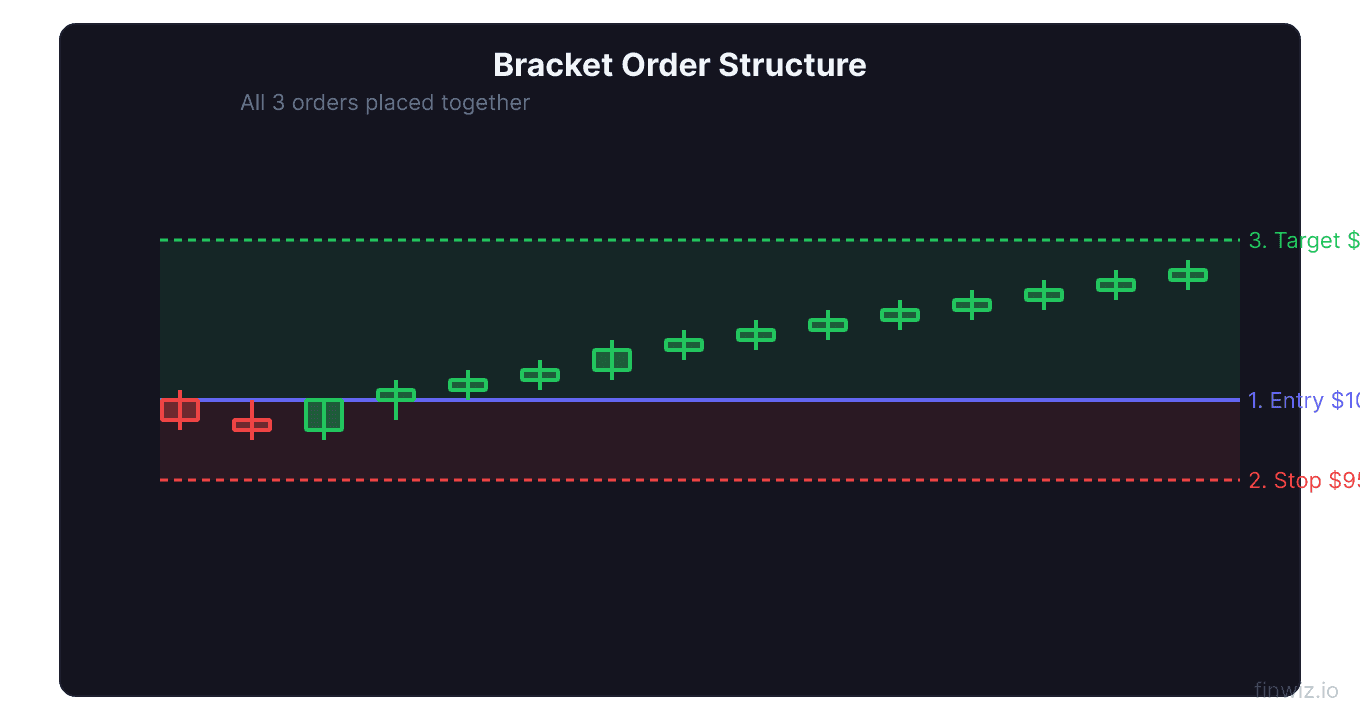
- A stock is trading at $48.00. You identify a pullback entry and want to buy at $47.50 (support level).
- Your analysis indicates a stop loss at $46.00 and a profit target at $52.00.
- You place a bracket order:
- Entry: Buy limit at $47.50
- Stop loss: Sell stop at $46.00
- Profit target: Sell limit at $52.00
- The stock drops to $47.50 and your entry fills.
- Immediately, the stop loss ($46.00) and profit target ($52.00) are placed automatically.
- Days later, the stock reaches $52.00 and your profit target fills.
- The stop loss at $46.00 is automatically cancelled.
You captured a $4.50 profit per share ($52.00 - $47.50) without needing to manually place or cancel any orders after the initial setup.
The OCO Component
OCO (One-Cancels-Other) is the mechanism that links the stop loss and profit target. Without OCO, you would need to manually cancel the stop when the target fills (or cancel the target when the stop fills). If you forget, you could end up with an unintended open order that fills later, creating a new position you did not want.
OCO eliminates this risk. The two orders are treated as a pair: when one fills, the other disappears.
Pro Tip
Types of Bracket Orders
Standard Bracket
The most common type. Entry order + stop loss + profit target, all defined upfront.
Trailing Bracket
Some platforms allow you to replace the profit target with a trailing stop. The entry and stop loss work as usual, but instead of a fixed target, a trailing stop follows the price upward, locking in progressively more profit.
Partial Bracket
Advanced platforms allow you to split the exit into multiple targets. For example:
- 50% of the position exits at Target 1 ($50.00)
- 50% exits at Target 2 ($54.00) or via trailing stop
- Stop loss protects the entire position until partial exits occur
Setting Up a Bracket Order
Defining the Entry
Your entry can be a limit order (buying at a specific price or better), a stop order (buying on a breakout above a level), or a market order (buying immediately).
For swing trading, limit entries at support levels and stop entries on breakouts are the most common.
Defining the Stop Loss
Place your stop at the level where your trade thesis is invalidated:
- Below support for long entries
- Below the moving average for moving average bounce entries
- 1.5-2x ATR below entry for volatility-adjusted stops
Defining the Profit Target
Set your target at:
- The next resistance level for long trades
- A risk-reward ratio of at least 2:1
- The measured move projection for pattern breakouts
Risk-Reward Check:Advantages of Bracket Orders
Automation
Once placed, bracket orders manage themselves. You do not need to watch the screen, remember to place stops, or panic about setting targets. Everything is pre-defined and automated.
Emotional Control
By setting your stop and target at the time of entry, you make decisions when you are calm and analytical rather than when the trade is live and emotions are running high. This prevents fear and greed from influencing your exits.
Risk Management
Bracket orders enforce discipline. Every trade has a defined maximum loss (the stop) and a defined profit objective (the target). This structure supports proper position sizing and risk-reward discipline.
Time Efficiency
For swing traders with full-time jobs, bracket orders are essential. You can analyze charts and set up trades in the evening, and the orders execute automatically during the next trading day. This makes swing trading compatible with any schedule.
Limitations of Bracket Orders
Inflexibility
Once placed, the stop and target are fixed (unless you manually modify them). If market conditions change, you need to actively adjust the bracket. Some traders find this rigidity frustrating when a trade is developing differently than expected.
Gap Risk
Like all stop orders, the stop-loss component of a bracket order is vulnerable to gaps. If the stock gaps past your stop, you fill at the gap price, not your stop price.
Platform Variations
Not all brokerages implement bracket orders the same way. Some call them "OTO" (One-Triggers-Other), others call them "conditional orders," and the interface varies significantly. Familiarize yourself with your specific platform's implementation before using bracket orders with real money.
Partial Fills
If your entry order partially fills (e.g., you wanted 500 shares but only 300 filled), the stop and target are typically placed for the filled quantity only. Check your broker's policy on how partial fills affect bracket orders.
Best Practices
- Always verify before submitting: Double-check the entry price, stop price, target price, and share quantity before placing the order.
- Set alerts: Even though the bracket manages itself, set price alerts at your stop and target levels so you are aware of when they fill.
- Review active brackets: Log into your brokerage at least once per day to review active bracket orders and ensure they are still appropriate.
- Practice on paper: Use a paper trading account to practice setting up bracket orders before risking real capital.
- Know your platform: Different platforms handle bracket modifications differently. Learn how to modify and cancel brackets on your specific platform.
Frequently Asked Questions
Can I modify a bracket order after it is placed?
Yes. You can modify the stop price, target price, or share quantity of a bracket order at any time before those orders fill. On most platforms, you can modify each leg independently. If the entry has already filled, you can modify the stop and target without affecting the position.
What happens if both my stop and target fill at the same time?
This is extremely rare but theoretically possible in very volatile markets. Most brokers have safeguards to prevent this. If it does happen, you would end up flat (one order opened and the other closed the position). Contact your broker if you believe both legs filled erroneously.
Do all brokers support bracket orders?
Most major online brokers support bracket orders, though they may call them by different names (OTO, conditional orders, advanced orders). Some brokers limit bracket order functionality to their desktop platforms and do not offer them on mobile apps. Check your broker's order type documentation.
Can I use bracket orders for short selling?
Yes. A short-selling bracket works in reverse: the entry is a sell (short) order, the stop is a buy order above the entry (to limit losses), and the target is a buy order below the entry (to take profits). The OCO logic works the same way.
Should I use bracket orders for every trade?
For swing trades where you have defined entries, stops, and targets, yes. Bracket orders enforce the discipline that many traders lack when managing orders manually. For trades where you plan to trail your stop manually or make dynamic exit decisions, a standard entry with a separate stop-loss order may be more appropriate.
Disclaimer
This is educational content, not financial advice. Trading involves risk, and you should consult a qualified financial advisor before making any investment decisions. Past performance does not guarantee future results.
Additional Considerations
Order Types and Trading Platforms
Different brokerage platforms offer varying levels of order type functionality. When choosing a broker, verify that it supports the order types your trading plan requires. Key features to confirm include:
- Support for bracket orders and OCO (One-Cancels-Other) logic
- Trailing stop functionality with both percentage and dollar-based options
- Stop-limit orders with customizable buffer distances
- Extended hours order capability
- Mobile app support for all order types (not just market and limit)
- Conditional orders that trigger based on price, time, or other criteria
Many beginning traders start with a broker that offers limited order types and later realize they need more sophisticated tools. Consider your future needs when choosing a platform, not just your current requirements.
Order Type Selection by Market Condition
The optimal order type varies with market conditions:
During normal volatility, limit orders are the default choice for entries and profit targets. They provide price control with reasonable fill probability.
During high volatility, consider using wider limit prices or market orders for urgent exits. Spreads widen during volatility, making tight limit orders less likely to fill when you need them most.
During pre-market and after-hours sessions, always use limit orders. Market orders in extended hours can fill at prices far from the last regular-session price.
During earnings announcements and major news events, be prepared for rapid price changes that can affect all order types. Stop-loss orders may fill with significant slippage, and stop-limit orders may not fill at all.
Building an Order Type Workflow
Develop a consistent workflow for placing orders:
- Analyze the chart and identify your entry, stop, and target levels
- Calculate position size based on your stop distance
- Select the appropriate entry order type (limit for planned levels, stop for breakouts)
- Set your protective stop (stop-loss or stop-limit based on your preference)
- Set your profit target (limit order at your target level)
- Consider a bracket order to automate steps 3-5 as a single package
- Review all order details before submitting
This systematic approach ensures you never enter a trade without complete risk management in place.
Related Articles
12 chapters covering charts, indicators, risk management & more. Plus weekly trading insights.