
Stock Order Types: Complete Guide to Every Order
⚡ Key Takeaways
- Market orders guarantee execution but not price; limit orders guarantee price but not execution
- Stop-loss orders protect against downside by triggering a sell when price hits a specified level
- Advanced order types like bracket orders and trailing stops automate both entries and exits, reducing emotional decision-making
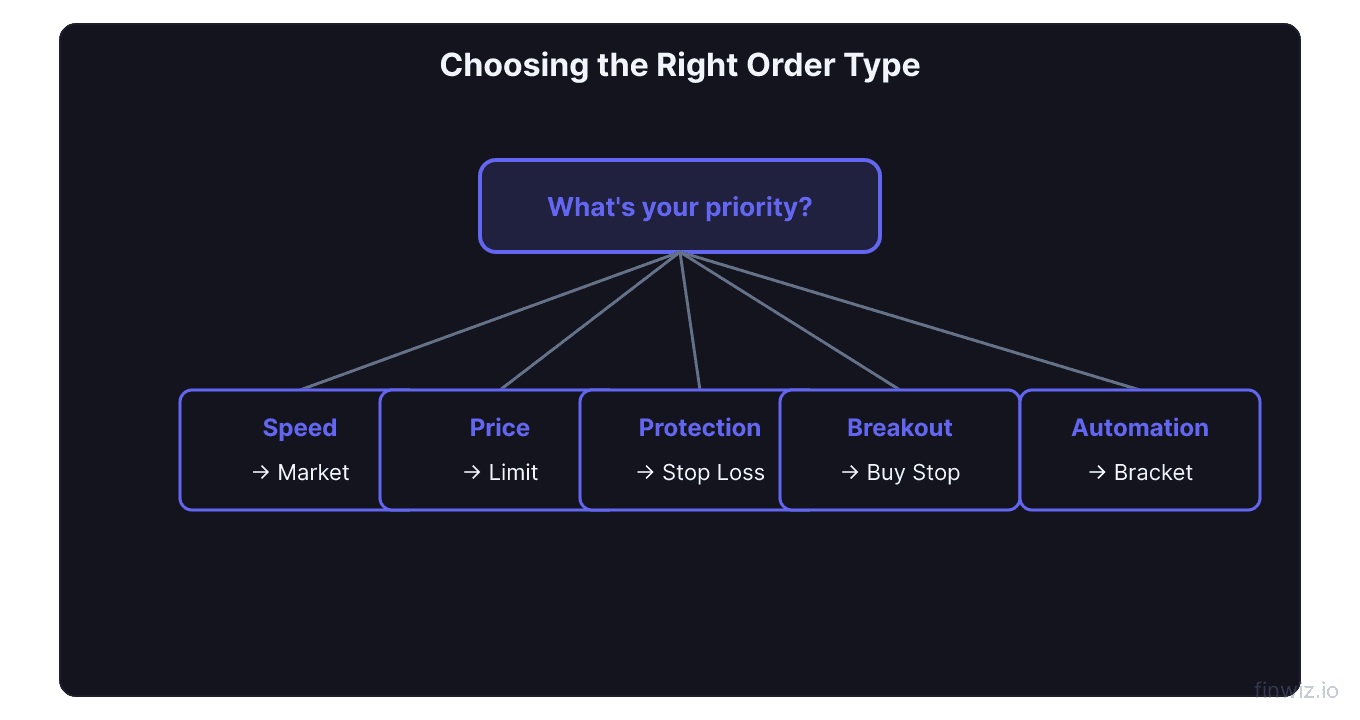
- Choosing the right order type depends on your priority: speed of execution, price control, or risk management
- Every trader should understand all major order types before placing real money trades
Why Order Types Matter
Every trade begins with an order. The order type you choose determines your execution price, your fill speed, and your risk exposure. Using the wrong order type can cost you hundreds of dollars on a single trade through slippage, missed fills, or unprotected downside.
Most beginners default to market orders for everything. That works in calm, liquid markets. But when volatility spikes — earnings announcements, Fed decisions, gap opens — the wrong order type can turn a good trade idea into a painful loss. Understanding the full toolkit gives you control over how your trades execute.
This guide covers every major order type, compares them side by side, and explains when to use each one.
Order Type Comparison Table
| Order Type | Execution Speed | Price Guarantee | Best For |
|---|---|---|---|
| Market Order | Instant | No | Urgent entries/exits in liquid stocks |
| Limit Order | Not guaranteed | Yes | Precise entries at support/resistance |
| Stop Loss | Triggers at price | No (becomes market) | Downside protection |
| Stop-Limit | Triggers at price | Yes (after trigger) | Controlled exits in volatile stocks |
| Trailing Stop | Triggers dynamically | No (becomes market) | Locking in profits on trending stocks |
| Bracket Order | Conditional | Mixed | Complete trade management |
This table is your quick reference. The sections below break down each type in detail.
Market Orders
A market order is the simplest order type. It tells your broker to buy or sell immediately at the best available price. There is no price condition — you accept whatever the market offers.
Market orders are ideal when speed matters more than price. If AAPL is trading at $185.50 and you need to exit a losing position now, a market order guarantees you get out. Your fill might be $185.48 or $185.52, but you will be filled.
The downside is slippage — the difference between the price you expected and the price you received. In fast-moving or illiquid stocks, slippage can be significant. If a low-float stock is spiking on news and the bid-ask spread widens to $0.50, your market order could fill far from the quoted price. Read the full breakdown in our market order guide.
Pro Tip
Limit Orders
A limit order sets a maximum price you will pay (buy limit) or a minimum price you will accept (sell limit). The order only fills at your specified price or better.
Buy limit orders sit below the current price. If MSFT trades at $420 and you want to buy at $415, your limit order waits until the price drops to $415 or lower. If it never drops, you never buy — no fill, no harm.
Sell limit orders sit above the current price. They are used for profit targets. If you bought GOOGL at $175 and your target is $185, a sell limit at $185 ensures you exit at that price.
The trade-off is clear: you get price control but sacrifice guaranteed execution. In fast breakouts, a limit order can leave you watching from the sidelines as the stock runs without you. For a complete guide, see our limit order page.
Stop-Loss Orders
A stop-loss order triggers a sale when the stock drops to a specified price. It is the primary tool for managing downside risk. Once the stop price is hit, the order converts to a market order and executes at the next available price.
If you bought AMD at $160 with a stop loss at $155, your position is automatically sold if AMD drops to $155. Your maximum loss is capped at roughly $5 per share (slippage aside).
The key risk: stop-loss orders become market orders after triggering. In a gap down — say AMD opens at $148 after bad earnings — your stop at $155 triggers but fills at $148. This is called gap risk and is the primary vulnerability of standard stop losses.
For strategies on placing effective stop losses, read our stop loss guide.
Stop-Limit Orders
A stop-limit order combines the trigger mechanism of a stop loss with the price control of a limit order. When the stop price is hit, instead of becoming a market order, it becomes a limit order at a specified limit price.
Example: You own NFLX at $700. You set a stop-limit with a stop at $690 and a limit at $685. If NFLX drops to $690, a limit order to sell at $685 or better activates. If the stock falls below $685 before your order fills, it remains unfilled — and you are still holding a losing position.
This is the critical trade-off. Stop-limits prevent bad fills but introduce the risk of no fill at all. They work best in moderately volatile situations where you want protection but cannot tolerate the worst-case slippage of a regular stop loss. Full details in our stop-limit guide.
Trailing Stops
A trailing stop follows the stock price upward by a fixed dollar amount or percentage, then triggers a sell if the stock reverses by that amount. It automatically adjusts your stop level as the trade moves in your favor.
If you buy COIN at $250 with a $10 trailing stop, your initial stop is $240. If COIN rises to $280, your stop moves to $270. If COIN then drops $10 from any high, you are sold out. The trailing stop only moves up — never down.
This order type excels at capturing profits in trending stocks without requiring you to manually adjust your stop. It is the go-to tool for swing traders riding momentum. The risk is being stopped out by normal volatility — a temporary $10 pullback in a stock with a $15 daily range will trigger your stop even if the trend remains intact.
Trailing Stop Trigger Price = Highest Price Since Entry - Trail AmountLearn how to set optimal trail distances in our trailing stop guide.
Bracket Orders
A bracket order is a three-part order that automates your entire trade: entry, profit target, and stop loss. When the entry fills, two conditional orders are placed simultaneously — a sell limit (profit target) above and a stop loss below. When one fills, the other cancels automatically.
This is the most disciplined order type available. You define your risk-reward before entering the trade, and the bracket handles execution. There is no temptation to move your stop, no hesitation at your target. The trade manages itself.
Example: You enter AMZN at $200 with a bracket order — profit target at $210, stop loss at $195. If AMZN hits $210, you take $10 profit and the stop cancels. If it drops to $195, you take a $5 loss and the target cancels. Your risk-reward ratio is locked in at 2:1.
Bracket orders are available on most platforms including Thinkorswim, Interactive Brokers, and Webull. See our bracket orders guide for platform-specific setup instructions.
How to Choose the Right Order Type
The decision comes down to three variables: urgency, price sensitivity, and risk management needs.
Use market orders when you must get in or out immediately — cutting a loss, entering a breakout in a liquid large-cap, or reacting to breaking news.
Use limit orders when you have a specific price target and are willing to wait. Swing traders setting entries at support levels or exits at resistance should default to limits.
Use stop losses on every position. There is no exception. The only question is whether you use a standard stop, a stop-limit, or a trailing stop based on the stock's volatility and your strategy.
Use bracket orders when you want to fully automate your trade plan and remove emotion from the equation.
Frequently Asked Questions
Which order type has the least risk of slippage?
Limit orders have zero slippage because they only fill at your specified price or better. Stop-limit orders also provide slippage protection after they trigger. Market orders and triggered stop-loss orders carry the highest slippage risk, especially in volatile or illiquid stocks.
Can I use multiple order types on the same position?
Yes. A common approach is to enter with a limit order at a support level, place a stop loss below support, and set a sell limit at your profit target. This is essentially a manual bracket order. Many platforms also let you attach OCO (one-cancels-other) orders to manage exits.
Do order types work differently for options?
The same order types apply to options, but the impact of slippage is amplified because options have wider bid-ask spreads. Always use limit orders for options trades — never market orders. A market order on an illiquid options contract can fill at a price dramatically worse than the mid-point, instantly creating a losing trade.
12 chapters covering charts, indicators, risk management & more. Plus weekly trading insights.