
Trailing Stop Orders: How to Lock in Profits Automatically
⚡ Key Takeaways
- A trailing stop automatically adjusts to follow the price in your favor, locking in progressively more profit
- You can set a trailing stop as a fixed dollar amount or a percentage below the highest price reached
- Trailing stops only move in the favorable direction and never move backward
- They are ideal for capturing extended moves while protecting against sudden reversals
- Setting the trail too tight results in premature exits; setting it too wide gives back too much profit
What Is a Trailing Stop?
A trailing stop is a dynamic stop-loss order that automatically follows the price as it moves in your favor. Unlike a fixed stop loss that stays at one price, a trailing stop adjusts upward (for long positions) or downward (for short positions) as the stock makes new highs or lows.
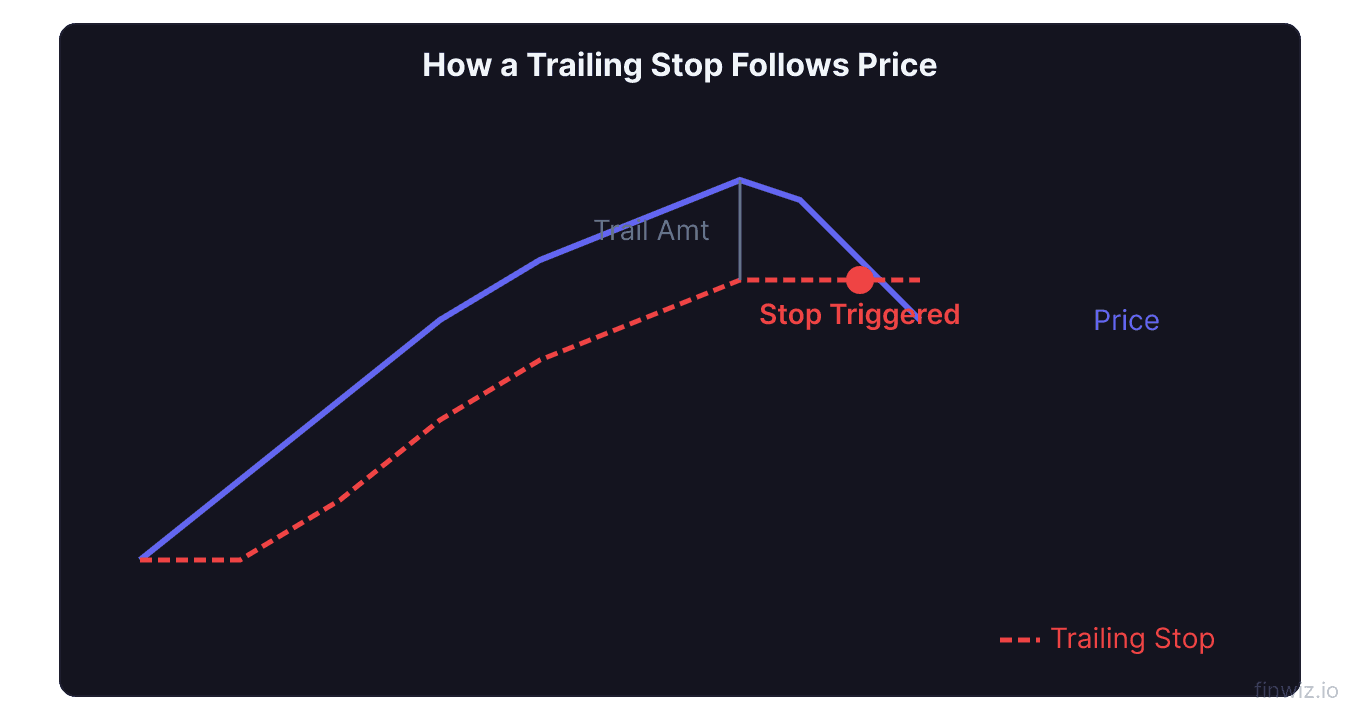
When the stock reverses by the trailing amount, the stop triggers and the position is closed. This mechanism allows you to ride a winning trade while automatically locking in profits as the price advances.
Trailing stops solve one of the most common trading psychology challenges: the tension between letting winners run and taking profits before they evaporate.
How Trailing Stops Work
For Long Positions
- You buy a stock at $50.00 and set a $3.00 trailing stop.
- Your initial stop is at $47.00 ($50.00 - $3.00).
- The stock rises to $53.00. Your stop automatically adjusts to $50.00 ($53.00 - $3.00).
- The stock rises to $58.00. Your stop adjusts to $55.00 ($58.00 - $3.00).
- The stock reverses and drops to $55.00. Your trailing stop triggers, and you sell at approximately $55.00.
- You captured $5.00 of profit per share ($55.00 - $50.00) even though the stock peaked at $58.00.
The trailing stop never moves backward. It only moves in the direction of your trade. Once the stock set a new high at $58.00, the stop locked at $55.00 and would never return to a lower level.
For Short Positions
The mechanics reverse. Your trailing stop follows the price downward as the stock falls, and triggers if the price rises by the trailing amount.
Percentage vs. Dollar Trailing Stops
Dollar-Based Trailing Stop
A dollar trailing stop maintains a fixed dollar distance from the highest price. If you set a $2.00 trail, the stop is always $2.00 below the peak.
Best for: Stocks in a consistent price range where the dollar volatility is predictable.
Percentage-Based Trailing Stop
A percentage trailing stop maintains a fixed percentage distance. If you set a 5% trail, the stop is always 5% below the highest price.
Trailing Stop Price = Highest Price x (1 - Trail Percentage)Best for: Stocks across different price levels. A 5% trail adapts proportionally to both a $20 stock and a $200 stock.
| Method | Pros | Cons |
|---|---|---|
| Dollar trail | Simple, fixed risk per share | Does not adapt to stock price changes |
| Percentage trail | Proportional, works across price levels | May be too tight or too wide at certain prices |
Pro Tip
Setting the Right Trail Distance
The trail distance is the most important decision. Too tight, and you get stopped out on normal pullbacks. Too wide, and you give back too much profit on reversals.
Use ATR as a Guide
The Average True Range (ATR) measures a stock's typical daily movement. Setting your trail at 1.5 to 2 times the ATR ensures the stock has room to fluctuate normally without triggering your stop.
Trailing Stop Distance = 1.5 to 2.0 x ATR(14)For a stock with a 14-day ATR of $2.50:
- Moderate trail: $3.75 (1.5 x $2.50)
- Wide trail: $5.00 (2.0 x $2.50)
Match the Trail to Your Strategy
| Trading Style | Trail Distance | Rationale |
|---|---|---|
| Day trading | 0.5-1.0 ATR | Tight, captures small moves |
| Swing trading | 1.5-2.0 ATR | Moderate, captures multi-day swings |
| Position trading | 2.5-3.0 ATR | Wide, captures major trends |
When to Use Trailing Stops
After Your Initial Target Is Hit
A common approach is to use a fixed profit target for the first portion of your position and a trailing stop for the remainder. Sell half at your target, then trail the stop on the remaining half. This locks in guaranteed profits while leaving room for an extended move.
During Strong Trends
Trailing stops shine in strongly trending markets. When a stock enters a powerful uptrend, you do not want to cap your upside with a fixed target. A trailing stop lets you stay in the trade as long as the trend continues, potentially capturing much larger moves than a fixed target would allow.
When You Cannot Monitor the Market
Trailing stops work automatically. If you are a swing trader who cannot watch the market during the day, a trailing stop manages your exit without your intervention.
When NOT to Use Trailing Stops
In Choppy, Range-Bound Markets
In sideways markets, prices oscillate within a range and frequently reverse. Trailing stops get triggered by normal oscillations, resulting in a series of small losses or premature exits. In range-bound conditions, fixed profit targets at resistance and fixed stops at support work better.
For Very Short-Term Trades
Scalping and very short-term day trades require precise exits. The lag inherent in a trailing stop can cause you to give back a disproportionate amount of your small profits. For these trades, fixed targets and manual exits are more appropriate.
Manual vs. Automatic Trailing Stops
Automatic trailing stops are set in your broker's platform and adjust in real time as the price moves. They are hands-off but inflexible, using a single dollar or percentage amount.
Manual trailing stops involve you moving your stop order manually based on price action. For example, after each new swing high, you move your stop to just below the most recent swing low. This approach is more flexible and adapts to the stock's structure.
Manual approaches include:
- Swing low trail: Move the stop below each new higher swing low
- Moving average trail: Trail below the 10 EMA or 20 EMA
- Candle low trail: After each new daily high, move the stop below the previous day's low
Frequently Asked Questions
Can a trailing stop guarantee I lock in profits?
Not entirely. If a stock gaps past your trailing stop overnight, your order will execute at the gap price, which could be significantly below your trail level. Trailing stops protect against gradual reversals but not against overnight gaps. For gap protection, consider using options or reducing position size.
Should I use a trailing stop from the moment I enter a trade?
Many traders prefer to use a fixed stop loss initially and switch to a trailing stop only after the trade moves into profit by at least 1:1 (your risk amount). Starting with a trailing stop immediately can result in being stopped out before the trade has a chance to develop.
What is the best trailing stop percentage?
There is no universal best percentage. It depends on the stock's volatility and your trading style. A range of 5-10% works for most swing trades. Use the ATR to calibrate the trail to each individual stock rather than applying a one-size-fits-all percentage.
Do trailing stops work after hours?
Standard trailing stops are active only during regular trading hours. They do not protect against after-hours or pre-market price movements. Some brokers offer extended-hours trailing stops, but liquidity during these sessions is thin and fills may be poor.
Can I use a trailing stop on the buy side?
Yes. A buy trailing stop follows the price downward and triggers a buy order if the price rises by the trailing amount. This is used by short sellers to protect short positions or by traders waiting for a bottom to form before entering a long position.
Disclaimer
This is educational content, not financial advice. Trading involves risk, and you should consult a qualified financial advisor before making any investment decisions. Past performance does not guarantee future results.
Additional Considerations
Order Types and Trading Platforms
Different brokerage platforms offer varying levels of order type functionality. When choosing a broker, verify that it supports the order types your trading plan requires. Key features to confirm include:
- Support for bracket orders and OCO (One-Cancels-Other) logic
- Trailing stop functionality with both percentage and dollar-based options
- Stop-limit orders with customizable buffer distances
- Extended hours order capability
- Mobile app support for all order types (not just market and limit)
- Conditional orders that trigger based on price, time, or other criteria
Many beginning traders start with a broker that offers limited order types and later realize they need more sophisticated tools. Consider your future needs when choosing a platform, not just your current requirements.
Order Type Selection by Market Condition
The optimal order type varies with market conditions:
During normal volatility, limit orders are the default choice for entries and profit targets. They provide price control with reasonable fill probability.
During high volatility, consider using wider limit prices or market orders for urgent exits. Spreads widen during volatility, making tight limit orders less likely to fill when you need them most.
During pre-market and after-hours sessions, always use limit orders. Market orders in extended hours can fill at prices far from the last regular-session price.
During earnings announcements and major news events, be prepared for rapid price changes that can affect all order types. Stop-loss orders may fill with significant slippage, and stop-limit orders may not fill at all.
Building an Order Type Workflow
Develop a consistent workflow for placing orders:
- Analyze the chart and identify your entry, stop, and target levels
- Calculate position size based on your stop distance
- Select the appropriate entry order type (limit for planned levels, stop for breakouts)
- Set your protective stop (stop-loss or stop-limit based on your preference)
- Set your profit target (limit order at your target level)
- Consider a bracket order to automate steps 3-5 as a single package
- Review all order details before submitting
This systematic approach ensures you never enter a trade without complete risk management in place.
Related Articles
12 chapters covering charts, indicators, risk management & more. Plus weekly trading insights.