
Limit Order vs Stop Order: Which to Use & When
⚡ Key Takeaways
- Limit orders guarantee your price but not execution; stop orders guarantee execution but not your price
- Limit orders sit passively waiting for the market to reach your price; stop orders activate only when a trigger price is hit
- Stop orders convert to market orders when triggered, which means slippage is possible in fast-moving markets
- Limit orders are best for planned entries and profit targets; stop orders are best for protective exits
- Understanding when each order type fails helps you avoid the most common trading mistakes
Limit Order vs. Stop Order: Key Differences Explained
A limit order and a stop order work in fundamentally different ways despite both allowing you to set a specific price. A limit order executes only at your specified price or better, giving you price control but no guarantee of execution. A stop order activates when the stock reaches your trigger price and then executes at the best available market price, giving you execution certainty but no price control. Choosing the wrong one can mean missing a trade entirely or getting filled at an unexpected price.
These two order types solve different problems. Limit orders answer "I want to buy or sell at this price or better." Stop orders answer "If the price reaches this level, get me in or out immediately." Understanding both is essential for managing entries, exits, and risk.
What Is a Limit Order?
A limit order instructs your broker to buy or sell a security only at a specific price or better. "Better" means a lower price for buy limits and a higher price for sell limits.
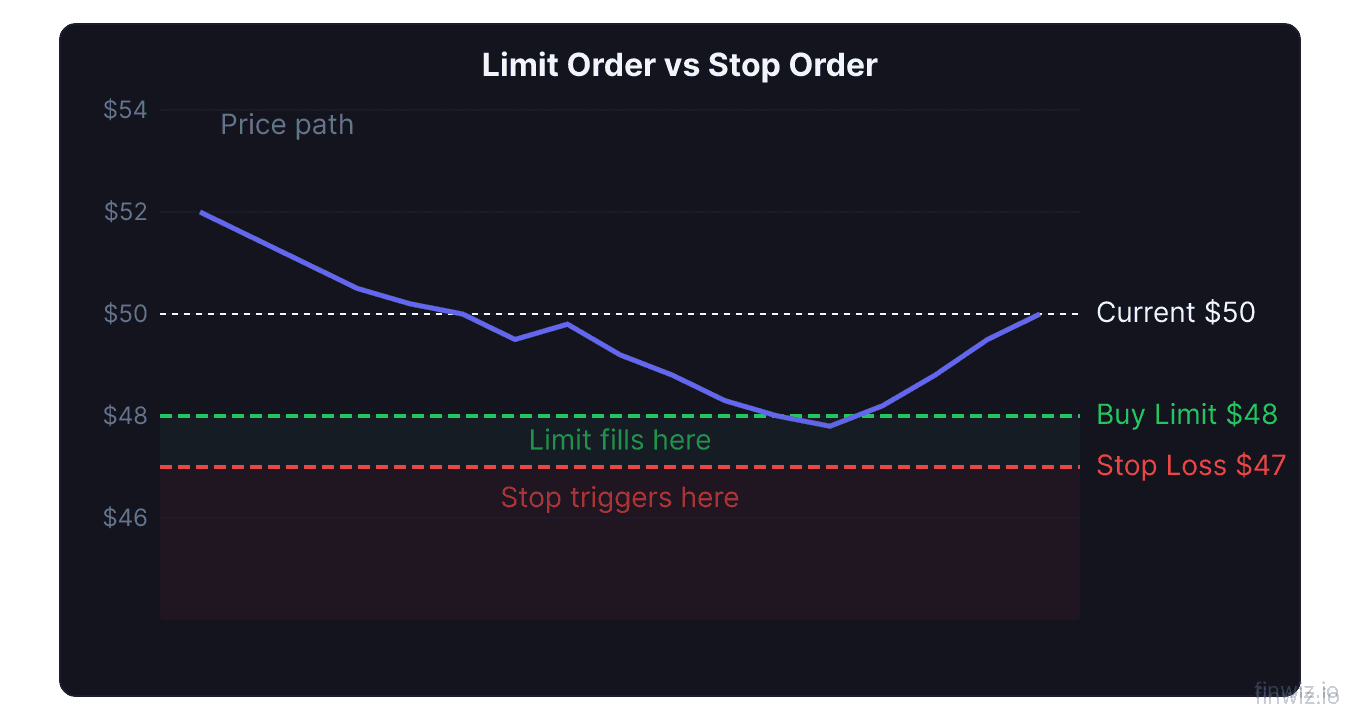
Buy limit order: You set a maximum price you are willing to pay. If the stock is currently at $50 and you place a buy limit at $48, your order will only execute if the stock drops to $48 or lower. If it never drops to $48, the order never fills.
Sell limit order: You set a minimum price you are willing to accept. If you own a stock at $50 and place a sell limit at $55, the order only fills if the stock rises to $55 or higher.
Limit orders sit on the order book as resting orders. They provide liquidity to the market and give you complete control over the price you pay or receive. The trade-off is that the market may never reach your price, leaving you on the sidelines.
What Is a Stop Order?
A stop order (also called a stop-loss order) instructs your broker to buy or sell a security once it reaches a specified trigger price. When the trigger price is hit, the stop order converts to a market order and executes at the next available price.
Sell stop order (stop-loss): You set a trigger below the current price. If you own a stock at $50 and set a stop at $47, the order activates if the stock drops to $47 and sells immediately at whatever price is available. This protects your downside.
Buy stop order: You set a trigger above the current price. If a stock is at $50 and you place a buy stop at $53, the order activates if the stock rises to $53, buying at the next available price. Traders use this to enter on breakouts.
The critical detail is that once triggered, a stop order becomes a market order. You are guaranteed to execute, but the fill price may differ from the trigger price, especially in fast markets.
Key Differences Between Limit Orders and Stop Orders
| Feature | Limit Order | Stop Order |
|---|---|---|
| Price guarantee | Yes (your price or better) | No (fills at market after trigger) |
| Execution guarantee | No (may not fill) | Yes (fills once triggered) |
| Resting behavior | Visible on order book | Hidden until triggered |
| Slippage risk | None | Possible, especially in gaps |
| Primary use | Entries and profit targets | Protective exits and breakout entries |
| Trigger mechanism | Fills when price reaches limit | Activates when price reaches stop |
| After activation | Remains a limit order | Converts to market order |
Price Guarantee vs. Execution Guarantee
This is the core trade-off between limit and stop orders, and understanding it prevents the most common mistakes.
Limit orders guarantee price. When you place a buy limit at $48, you will never pay more than $48. If the stock gaps down to $45 overnight, you buy at $45 — even better than your limit. The downside is that if the stock only drops to $48.10 and then rallies, your order sits unfilled and you miss the trade.
Stop orders guarantee execution. When you place a sell stop at $47, your order will trigger and execute if the stock hits $47. You will get out of the position. The downside is that in a fast decline, the stock might gap from $48 to $44, and your stop triggers at $47 but fills at $44 because that is the first available price.
Neither order type can guarantee both price and execution simultaneously. A stop-limit order attempts to bridge the gap by adding a limit to a stop trigger, but it sacrifices execution certainty in the process.
Pro Tip
Slippage Risk on Stop Orders
Slippage occurs when a stop order fills at a price worse than the trigger level. This is the primary risk of stop orders and it tends to occur at the worst possible times.
When slippage happens:
- Overnight gaps. A stock closes at $50, bad news hits after hours, and it opens at $43 the next morning. Your $47 stop triggers at the open and fills near $43, not $47.
- High-volatility events. During earnings announcements, Fed decisions, or market panics, prices can move several percent in seconds. A stop at $47 might fill at $46.50 or lower.
- Low-liquidity stocks. Stocks with wide bid-ask spreads and thin order books have fewer resting orders to absorb your stop, resulting in fills further from your trigger price.
- Flash crashes. Sudden, sharp declines can trigger cascades of stop orders, temporarily driving prices far below fair value.
How to manage slippage risk:
- Use wider stops on volatile stocks to account for normal price swings
- Avoid holding stops through known catalysts (earnings, FDA decisions)
- Consider stop-limit orders for situations where a gap past your price is preferable to a bad fill
- Size positions so that even with reasonable slippage, the loss remains within your risk tolerance
When Limit Orders Don't Fill
The failure mode of limit orders is non-execution, which creates a different kind of problem than slippage.
Near-miss scenarios. The stock drops to $48.02, reverses, and rallies to $60. Your $48.00 limit buy sat unfilled by two cents, and you missed the entire move. This is frustrating but common. Markets are not obligated to fill your order exactly at your price.
Partial fills. If you place a limit order for 1,000 shares at $48 and only 300 shares are available at that price, you may receive a partial fill. This is particularly common in options markets where volume at specific strikes can be thin.
Phantom liquidity. Displayed orders on the book can be cancelled before your order reaches them. The price may touch your limit on the screen but your order does not fill because the resting orders were pulled.
How to improve fill rates:
- Set limit prices slightly more aggressive than your ideal entry (e.g., $48.05 instead of $48.00)
- Use marketable limit orders (limit at or slightly through the current best price) for immediate execution with a price ceiling
- Stagger orders across multiple price levels to ensure partial fills at various prices
Common Mistakes with Limit and Stop Orders
Mistake 1: Using a limit order as a stop-loss. A sell limit below your entry does not protect you. If the stock is at $50 and you set a sell limit at $47, the order triggers immediately because $50 is already better than $47. You sell at $50, not $47. Use a sell stop for downside protection.
Mistake 2: Setting stops too tight. Placing a stop $0.50 below your entry on a stock that regularly swings $1-2 intraday guarantees you get stopped out by normal volatility. Set stops beyond the stock's average daily range.
Mistake 3: Forgetting to cancel open orders. If you placed a buy limit at $48 last week and the trade setup is no longer valid, cancel the order. Markets have a way of hitting stale limit orders at exactly the wrong time.
Mistake 4: Ignoring gaps with stop orders. Stop orders cannot protect you from overnight gaps. If gap risk is a concern, reduce position size or use options for defined-risk hedging instead.
Mistake 5: Confusing stop orders with stop-limit orders. A stop order converts to a market order at the trigger. A stop-limit order converts to a limit order at the trigger. They behave very differently when the stock moves fast.
When to Use Each Order Type
Use limit orders for:
- Planned entries at support and resistance levels
- Profit targets where you want to sell at a specific price
- Options trades (always use limits due to wide spreads)
- Pre-market and after-hours trading where liquidity is thin
- Buying pullbacks within an uptrend
Use stop orders for:
- Protective stop-losses on existing positions
- Breakout entries where you want to buy when price exceeds a key level
- Trailing stops that follow a stock higher and lock in gains
- Emergency exits during rapidly moving markets
- Automated risk management when you cannot monitor positions
Pro Tip
Frequently Asked Questions
Can I use both a limit order and a stop order on the same position?
Yes. Many traders place a stop order below their entry for protection and a sell limit above for their profit target. Some brokers offer bracket orders or OCO (one-cancels-other) orders that link the two so that when one fills, the other is automatically cancelled. This automates your exit on both sides.
Which order type is better for beginners?
Limit orders are safer for beginners because they prevent you from buying or selling at an unexpected price. Start by using buy limit orders for entries and sell limit orders for profit targets. As you gain experience, add stop-loss orders for downside protection. Avoid market orders on anything other than highly liquid ETFs like SPY.
Do stop orders work in after-hours trading?
At most brokers, standard stop orders are only active during regular market hours (9:30 AM to 4:00 PM Eastern). If a stock gaps significantly during pre-market or after-hours, your stop will not trigger until the regular session opens. Some brokers offer extended-hours stop orders, but liquidity is thin and fills may be poor.
What is the difference between a stop order and a stop-limit order?
A stop order converts to a market order when the trigger price is hit, guaranteeing execution but not price. A stop-limit order converts to a limit order when triggered, guaranteeing price but not execution. The stop-limit adds a price floor (or ceiling) to the triggered order, which means it may not fill if the stock moves too fast past the limit.
Should I use a stop order to lock in profits on a winning trade?
Yes, a trailing stop is specifically designed for this purpose. It follows the stock price upward by a fixed dollar amount or percentage. As the stock rises, the stop rises with it. If the stock reverses by the trailing amount, the stop triggers and you exit with gains. This lets profits run while providing automated downside protection.
Related Articles
12 chapters covering charts, indicators, risk management & more. Plus weekly trading insights.